 The Button Tool can be configured as one of five types: HyperLink, Execute, Launch, Standard, or View Default Trend. The [ButtonType] property determines the action. You can use the Button Tool to start applications outside of Studio.
The Button Tool can be configured as one of five types: HyperLink, Execute, Launch, Standard, or View Default Trend. The [ButtonType] property determines the action. You can use the Button Tool to start applications outside of Studio.
| [ButtonType] | Description | Configuration |
|---|---|---|
|
HyperLink |
Links CygNet Studio screens |
HyperLink opens the screen specified by the [FilePath] property and sets the destination screen’s [SiteService] and [Facility ID] to those specified by the [HyperLink Facility ID] and [HyperLink SiteService] properties. If the [HyperLink Facility ID] and [HyperLink SiteService] properties are blank it passes the parameters of the current screen. The [AutoClose] property enables automatic closing of TheView when the hyperlink button is clicked. Set the [NewViewGroup] property to Yes to allow multiple instances of the hyperlinked screen to be opened. The [Show] property specifies if the destination screen is opened minimized, maximized, normal, or default size. |
|
Launch |
Starts a CygNet application |
Launch runs a CygNet application specified by the [Application] property. The [Parameters] property can be used to specify command-line parameters. Note: You can ensure the launched application runs on the same (or different) domain by setting the /domain parameter in the .app file. |
|
Execute |
Starts any application. |
Execute runs the application specified by the [FilePath] property and passes the parameters specified using the [Parameters] property. If the [FilePath] specifies an executable, the application will be opened. For example, Notepad.exe will open Notepad. If the [FilePath] specifies a file, the file will be opened in the associated application. For example, Procedure.txt will open the Procedure document using Notepad. |
|
Standard |
Used for all other button tasks. |
Standard allows use of the EventClick (all other operational modes have an inherent Click event). |
|
View Default Trend |
Shows the Default Trend of TheView. |
View Default Trend shows the default trend of TheView. |
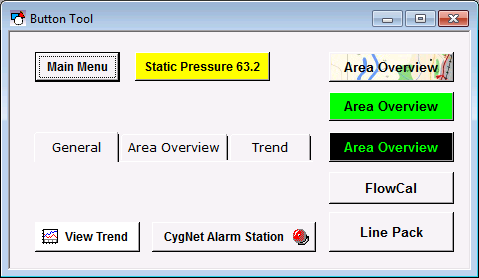
The default button shape is a square button. The ButtonShape property can be used to change the shape to an active tab or inactive tab.
The face of the button can show a label or point attributes, and it can be configured to show a bitmap and point state (concurrently or independently). See Button Tool - Showing a Label, Point Attribute, or Point State and Button Tool - Selecting an Image.
More:
 Button Tool - Showing a Label, Point Attribute, or Point State
Button Tool - Selecting an Image
Button Tool - Properties, Events, and Methods

|
|
|

